
How to fix a blurry, blocky or low-quality video
Repair old 480p/720p, phone and messenger videos: remove blur, noise and compression blocks with AI, then upscale to 1080p or 2K. Works offline on NVIDIA GPUs.
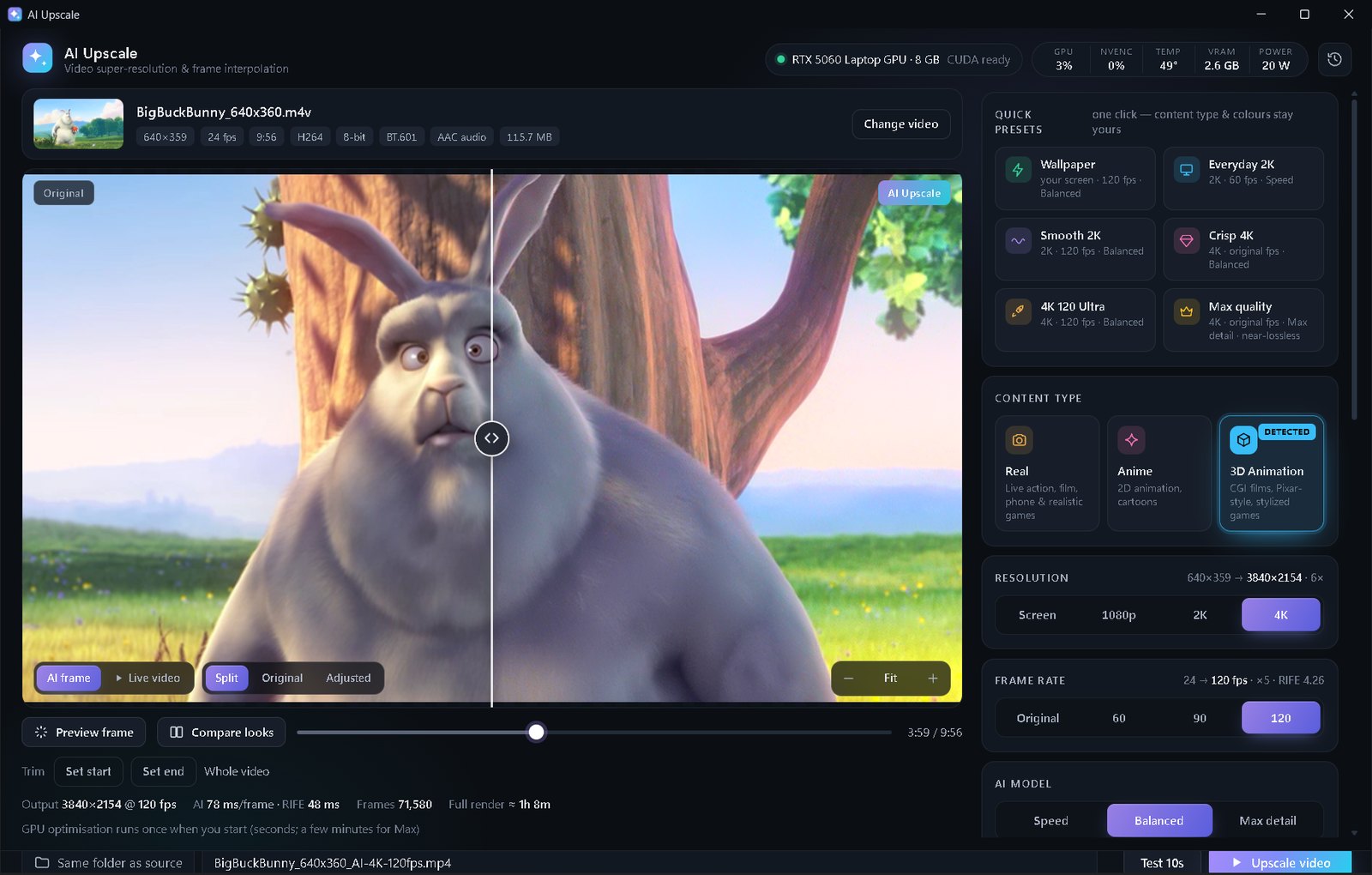
Open the video in AI Upscale, turn on Fix low-quality video (it switches on by itself for very low-res files), choose Real for camera footage, pick 1080p or 2K, check a Test 10s and click Upscale video.
Why old videos look so bad
Most “low quality” videos suffer from three things at once: low resolution (480p/720p), compression blocks from WhatsApp, Telegram or old phones, and noise from dark scenes. Plain upscaling makes all three bigger. You need models that were trained to repair damage first.
AI Upscale's Fix low-quality video mode switches to repair models (Real-ESRGAN x4plus and General v3 with strong denoise for real footage, APISR for anime), adds temporal noise reduction and debanding, and then upscales. It even detects “fake HD” files that were stretched from a lower resolution.
Step by step
- Open the video. If its real detail is 576p or lower, Fix low-quality video turns on automatically and a hint tells you why.
- Check the Content type: Real for phone/camera footage and realistic games, Anime for cartoons, 3D Animation for CGI films.
- Choose 1080p — the biggest visible improvement for 480p/720p sources. 2K also works in the free edition.
- Choose Balanced. For very damaged clips, Max detail (Premium) uses the heaviest repair model.
- Raise Noise reduction for grainy night videos; leave it around 30 for normal clips.
- Drag the before/after slider and zoom in on faces and text, then click Upscale video.
What to expect
- Big win: compression blocks, noise, banding and soft edges are cleaned up; the video looks like it came from a better camera.
- Be realistic: AI can't recover a face that is a few pixels wide or text that was never readable — it rebuilds plausible detail, not lost information.
- Colour too: use the Colour presets (Vivid, Cinematic, Warm…) for faded old clips — previewed live on the moving video.
💡 Free edition: up to 2K and clips under 1 minute (use Trim for longer videos). Premium ($5 once): any length, 4K, Max detail, 60/120 FPS, no ads.
FAQ
Can AI really fix a blurry video?
It can remove compression damage, noise and softness and rebuild believable detail. It cannot invent information that was never captured, like an unreadable licence plate.
What resolution should I upscale an old 480p video to?
1080p. Going straight to 4K mostly makes the file bigger; 1080p gives the clearest improvement for very low-res sources.
Is my private video uploaded anywhere?
No. AI Upscale runs entirely on your PC — your videos never leave it.